
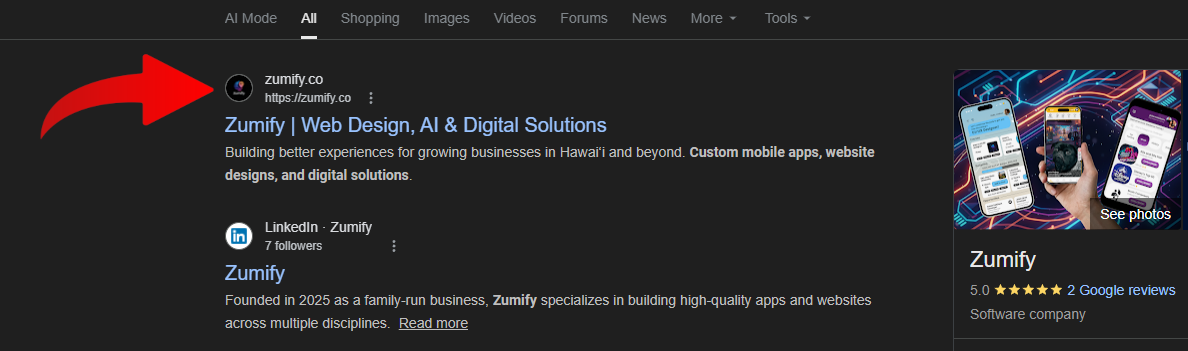
A favicon (short for "favorites icon") is the small image that appears next to your website's name in browser tabs, bookmarks, and, crucially, in Google Search results. This tiny graphic plays a surprisingly significant role in brand recognition and click-through rates. For site owners asking ways to implement a favicon to their website, the process is more straightforward than it might seem, but getting it to display correctly requires following a specific set of rules that many developers overlook.
How to Implement a Favicon
The basic implementation starts with creating your icon file. While browsers will accept .ico, .png, .svg, and .gif formats, we recommend using the .ico format for Google Search. The image must be square, and Google specifically recommends a minimum size of 48×48 pixels. You can also upload icons that are a multiple of 48: for example, 96×96 or 144×144 pixels. Once you have your image, place it in your site's public directory. Then add a <link> tag inside the <head> section of your HTML: <link rel="icon" href="/favicon.ico">.
Why Your Favicon Might Not Show Up on Google
First, Google must be able to crawl both your homepage and your favicon file. If either is blocked by robots.txt or requires authentication, Google simply can't index the icon. Second, your homepage must be indexable. A noindex directive will prevent your favicon from appearing in search results even if the image itself is accessible. Third, the <link rel="icon"> tag must be present on the page Google crawls. To confirm, right-click on your site and use your browser's inspect feature. Check the 'Elements' tab for the <head> tag. If the tag is not present, it likely means your rendering method is incompatible — we recommend server-side rendering. Google also won't display favicons it deems inappropriate or misleading, such as generic placeholder images, blank icons, or images that violate its content policies.

Why Timing Can Be a Factor
Even when everything is technically correct, Google may take weeks to update the favicon shown in search results. This is because Google recrawls pages on its own schedule, and the favicon shown in Search is cached independently from other page data. If you recently changed your favicon and the old one (or none at all) still appears, patience is often the only remedy. The best way to speed up the process is to name your icon file exactly favicon.ico, as Google specifically crawls for this filename on your website, making it easier to locate your site's icon.

Key Takeaways
Getting your favicon right is a great investment. A clean, recognizable icon reinforces brand trust in search results, makes your tabs easier to find in a crowded browser window, and signals to users that your site is professionally maintained. The checklist is clear: use a square image of at least 48×48 pixels, declare it properly in your HTML <head>, ensure it's publicly crawlable, rename the file to exactly 'favicon.ico', and verify your website is rendered properly. Do all of that, and your favicon will eventually find its rightful place next to your site name on Google.
Sources & References
Found this article helpful? Share it with your network!